Prepare these inputs
You can complete the required fields quickly, but the recommended context produces a more specific and useful audit.
Required information
- • Organization name and website
- • Main strategic outcome
- • Primary stakeholder or audience
- • Organization size and industry
- • Target markets
- • Recent crisis: Yes or No
- • At least one PR objective or custom goal
Recommended information
- • Plain-language company description
- • Up to five competitors
- • Current messages and official boilerplate
- • Active campaign or product launch
- • Special report instructions
- • Current website, lead, media, and brand metrics
Select an organization and choose New Audit
- 1. Sign in and open your dashboard.
- 2. Select the organization from the top menu.
- 3. Choose + New Audit.
The selected organization name and website are carried into the audit automatically. Choose Change in Step 1 if you selected the wrong organization.
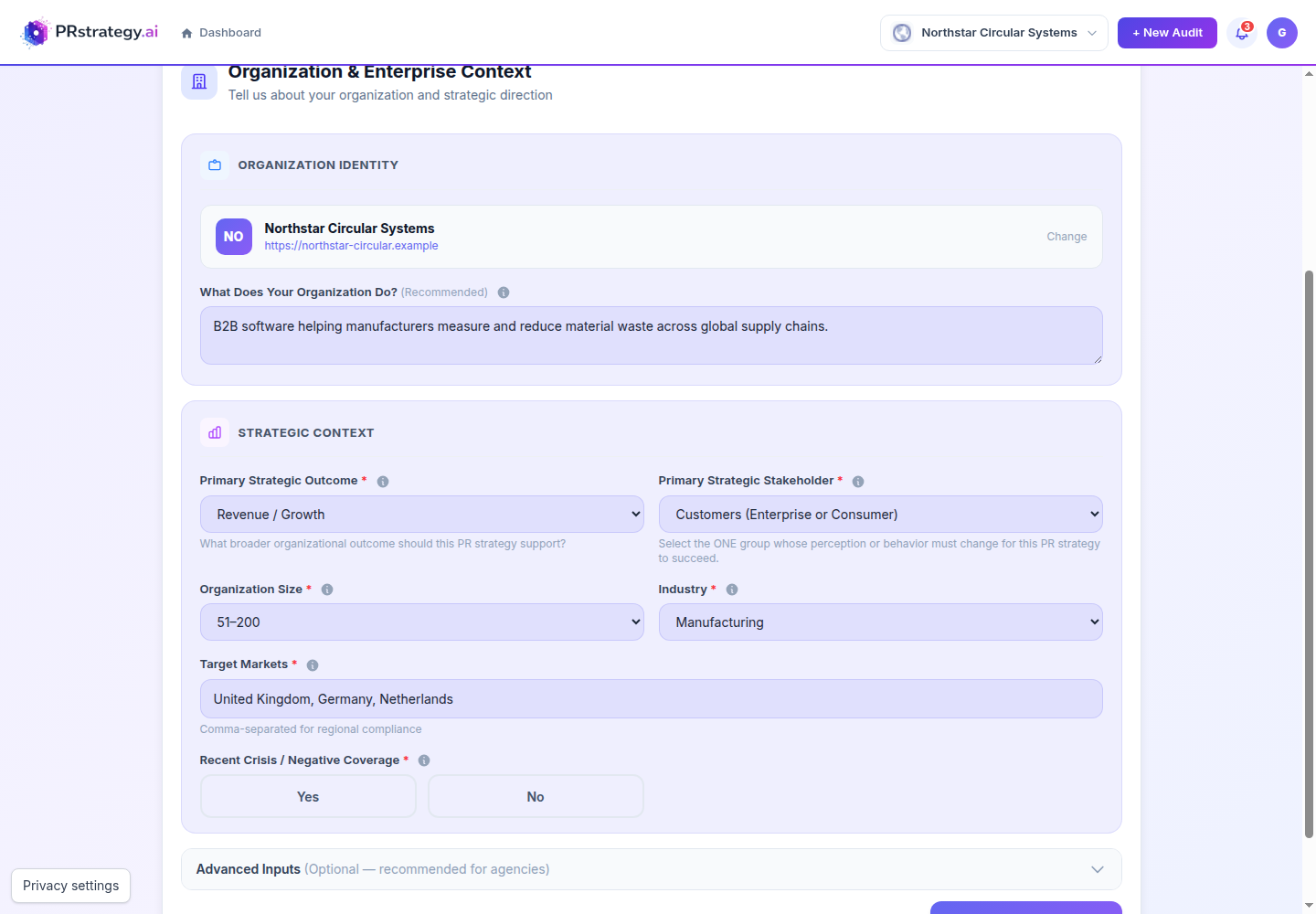
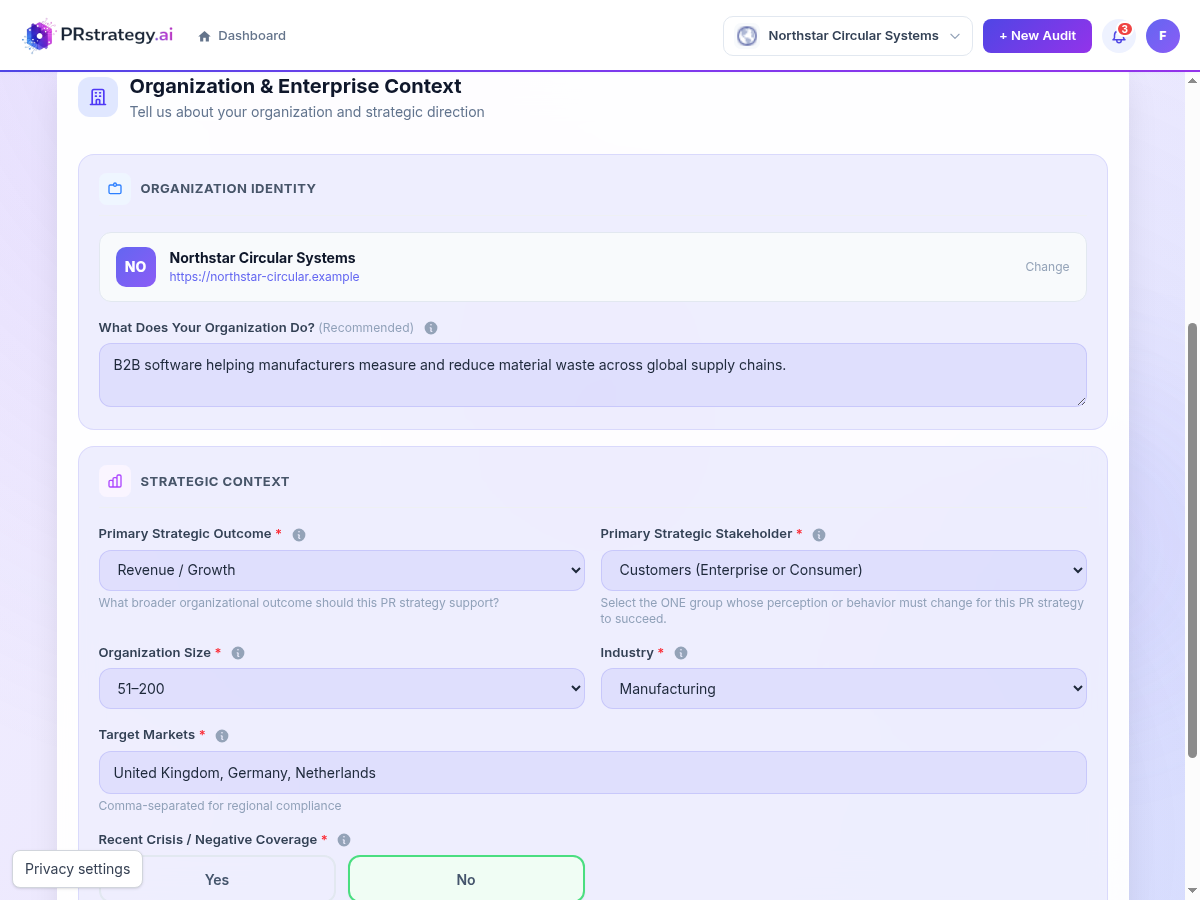
Organization & Enterprise Context
Explain what the organization does, which business result PR should support, and whose perception or behaviour needs to change.
- Organization identity RequiredConfirm the selected name and website. Add a short description using: “We help [audience] achieve [result] through [offering].”
- Strategic outcome RequiredChoose the single business outcome the PR programme must support, such as revenue, reputation, investor perception, or employer branding.
- Primary stakeholder RequiredChoose one main group. This drives the audit's messages, channels, stakeholder analysis, and KPIs.
- Size and industry RequiredUsed to calibrate recommendations and benchmarking. Choose the closest industry; use Other for a niche sector.
- Target markets RequiredEnter the countries or regions the communications programme must address, separated by commas.
- Recent crisis RequiredChoose Yes if recent negative coverage or a crisis should affect the diagnosis. If Yes, explain what happened and the current status.
Advanced inputs
Open Advanced Inputs to give the audit your current communications material.
- Key messaging OptionalList up to five current messages, one per line. Use statements the organization is actually communicating.
- Official boilerplate OptionalPaste the approved About Us paragraph from a recent press release.
- Campaign / product focus OptionalName the launch, campaign, or initiative that should receive extra attention in the recommendations.
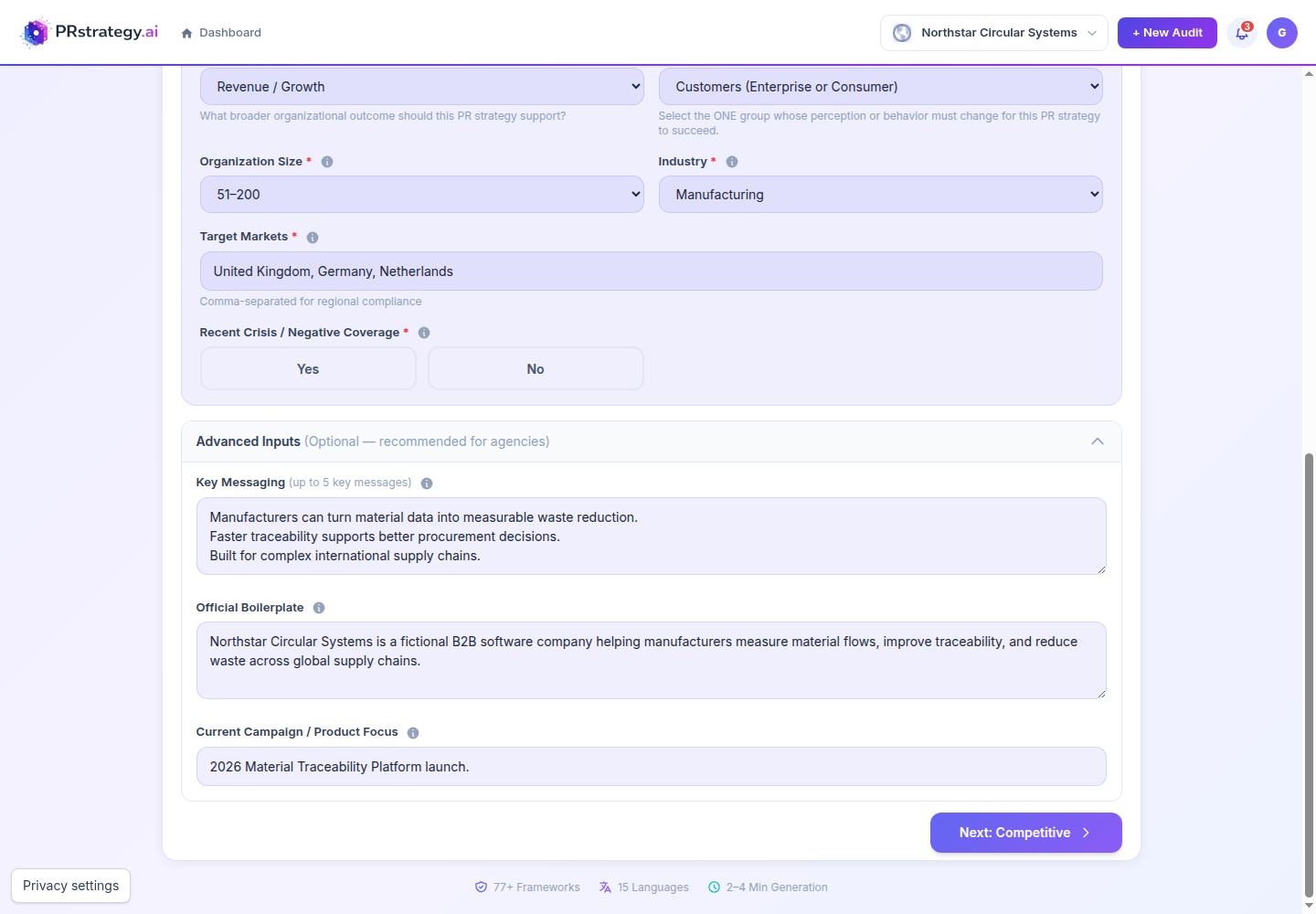
When the required fields are complete, choose Next: Competitive.
Competitive Landscape
Add up to five organizations that provide useful context for positioning and benchmarking. This step is optional and can be skipped.
- Name or URL OptionalA website URL gives the audit the clearest reference. Use the exact organization name if a URL is unavailable.
- Direct CompetitorCompetes for the same customers with a similar offer.
- Aspirational / BenchmarkAn organization whose reputation, communications, or market position you want to learn from.
- Emerging ThreatA newer or adjacent competitor that could become more important.
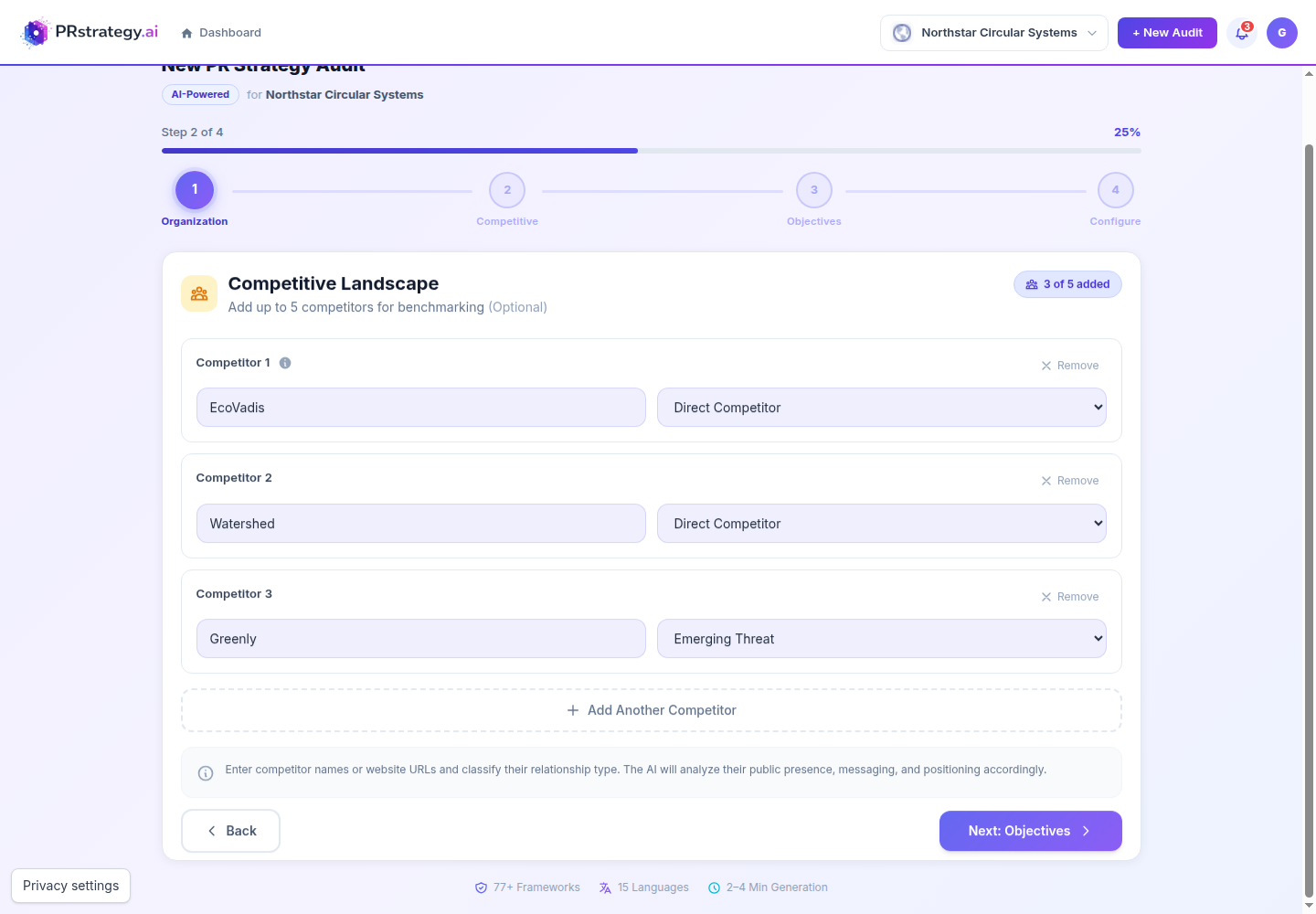
Choose Next: Objectives, or use Skip this step when no useful competitors are available.
PR & Communication Objectives
Choose the outcomes the communications programme must deliver. You may select up to five, then rank the three most important.
- Objectives RequiredSelect at least one objective, or enter a custom goal. Keep the selection focused rather than choosing every plausible outcome.
- Primary objective RequiredThe most important communications result. It receives the strongest emphasis in recommendations, KPIs, and the roadmap.
- Secondary / tertiary OptionalRank additional priorities only when they genuinely matter.
- Custom goal OptionalAdd a measurable goal not covered by the list. Include the audience, desired change, and time period where possible.
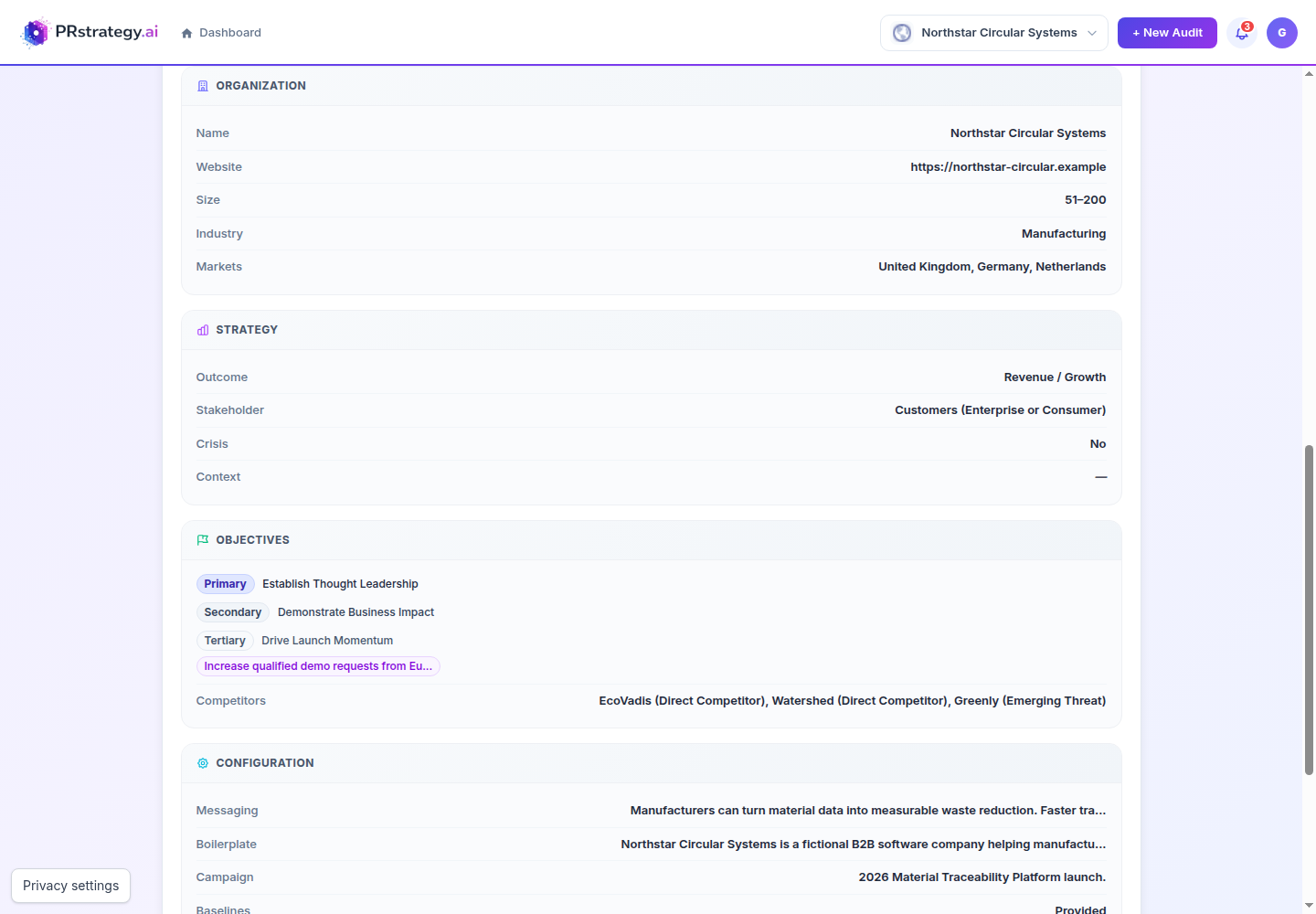
Custom goal: Increase qualified demo requests from European manufacturers by 20% within six months.
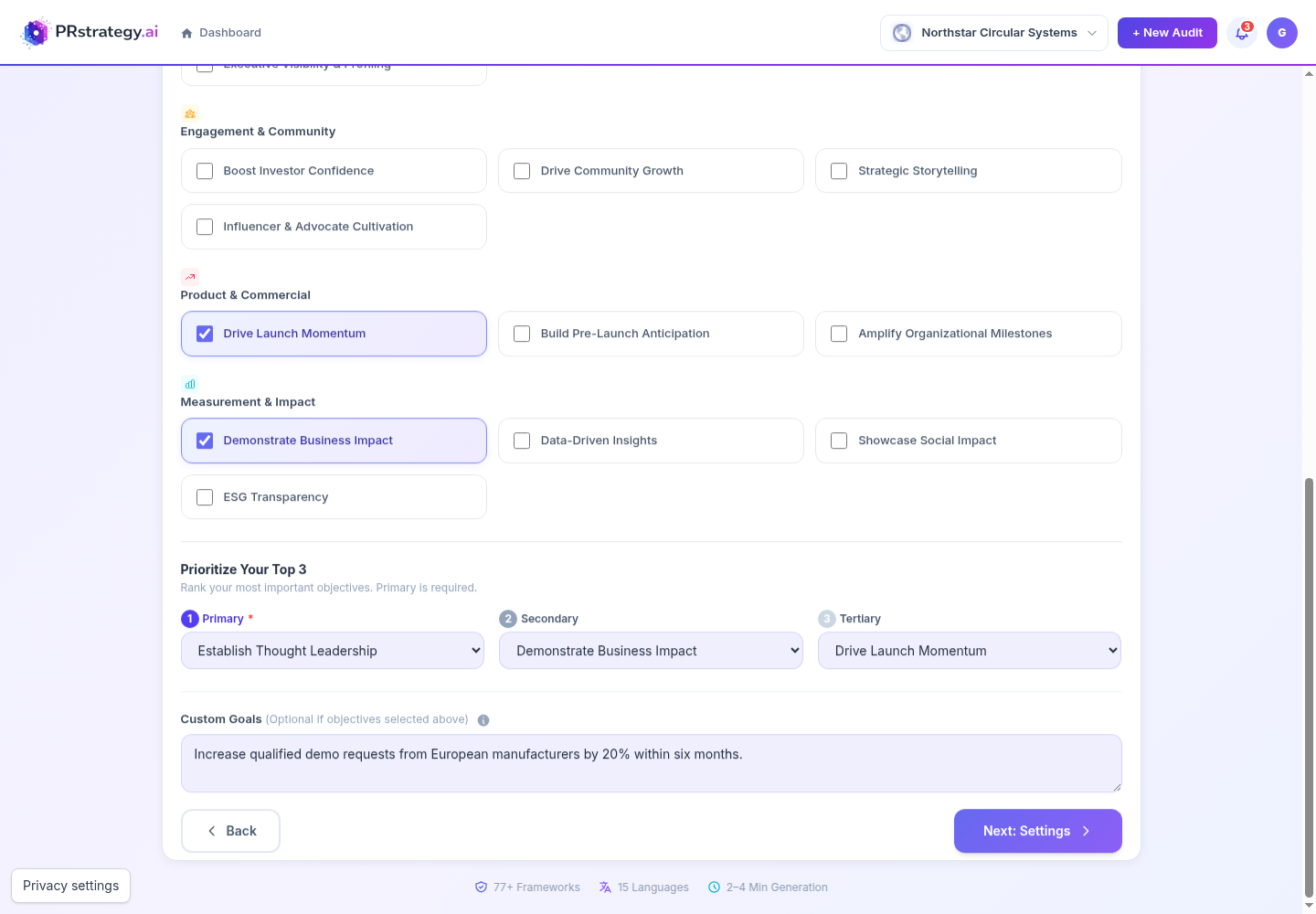
Choose Next: Settings after confirming the ranking.
Report Configuration & Review
Add any final instructions, provide real baseline measurements where available, then verify the complete summary before creating the audit.
- Custom directions OptionalState important constraints, audiences, regions, media priorities, exclusions, or evidence standards.
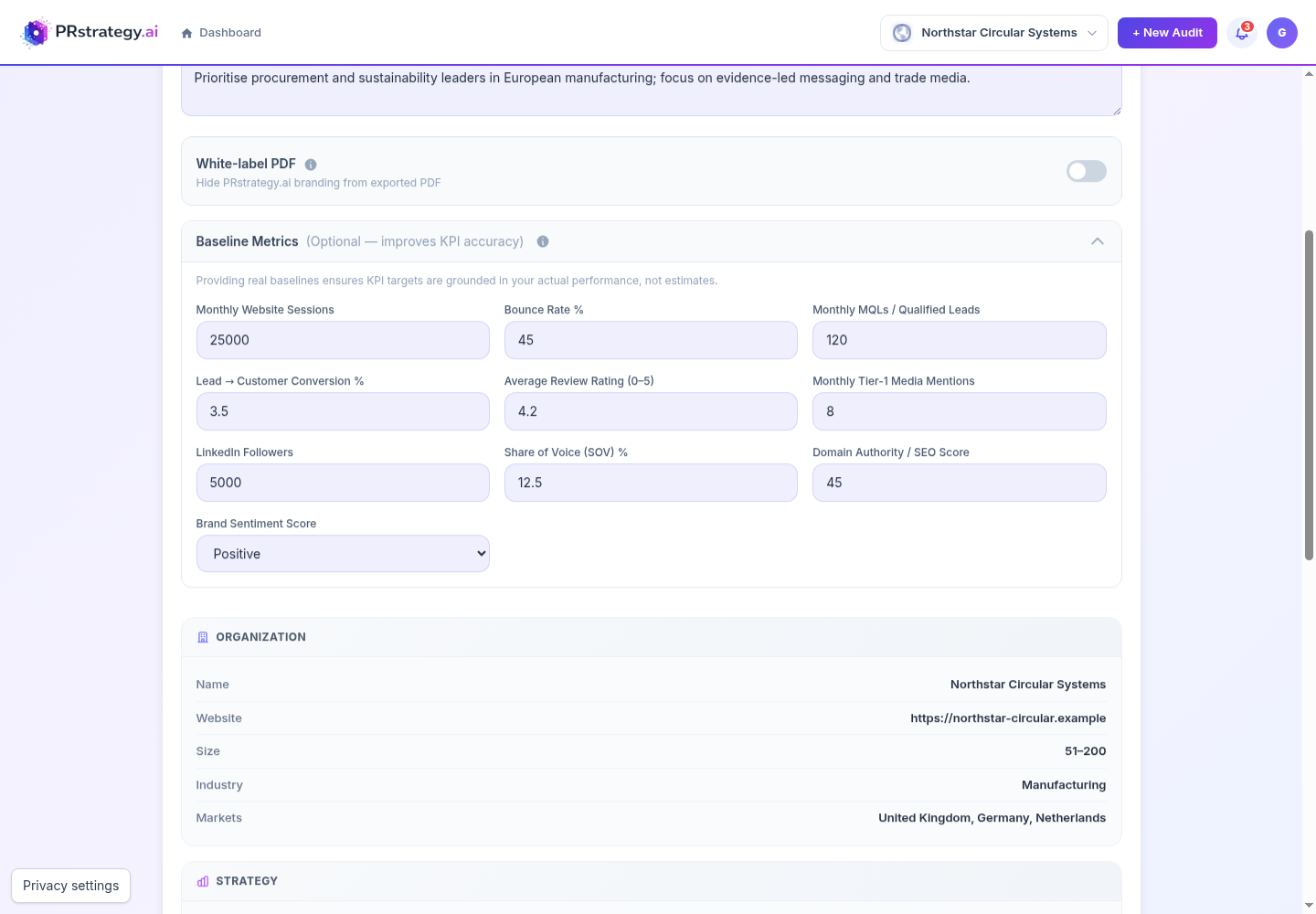
- White-label PDF Plan featureRemoves PRstrategy.ai branding from the exported PDF. This changes export branding, not the analysis.
- Baseline metrics RecommendedAdd known values for website sessions, bounce rate, qualified leads, conversion, reviews, media mentions, LinkedIn followers, share of voice, domain authority, and brand sentiment.
Example baselines: 25,000 monthly sessions · 45% bounce rate · 120 monthly MQLs · 3.5% conversion · 4.2 review rating · 8 monthly Tier-1 mentions · 5,000 LinkedIn followers · 12.5% share of voice · 45 domain authority · Positive sentiment.
Final check before submission
Read every section in the review summary. Use Back to correct anything inaccurate. Do not create the audit until the organization, strategy, objectives, competitors, and configuration all match your intended brief.
Choose Create Audit and follow its progress
- 1Choose Create Audit once the final review is correct.
- 2The app opens a progress page while the audit is queued and generated. You can return to the dashboard while it runs.
- 3When complete, open the audit from the organization dashboard and review the overall diagnosis, category findings, evidence, gaps, and priority actions.
- 4Use the report actions available on your plan to export, translate, generate a strategy, or run a future re-audit.
Re-Audit using the same settings
Use this option when the original brief is still correct and you want a fresh measurement for comparison. PRstrategy.ai copies the original organization, markets, objectives, competitors, configuration, and baselines into a new audit.
- 1Open the completed audit from the organization dashboard.
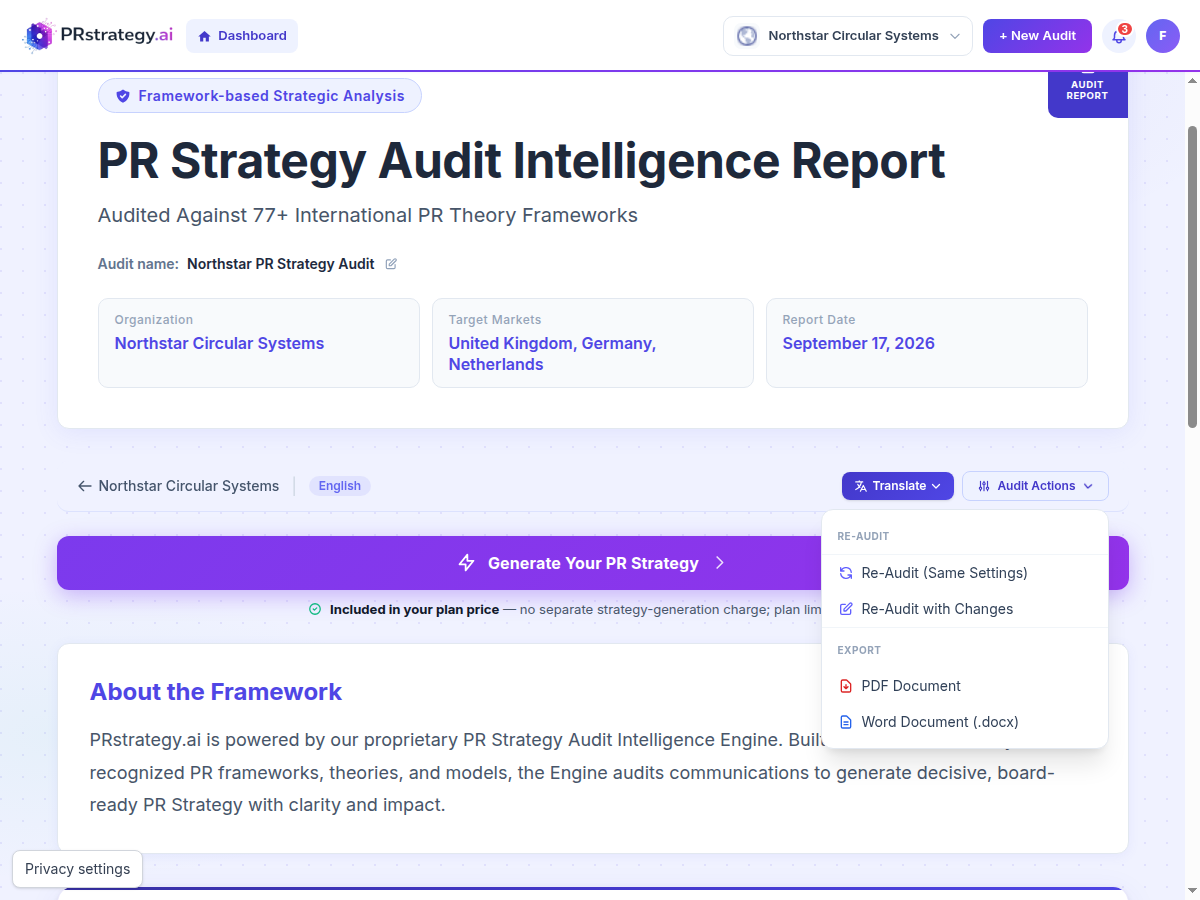
- 2Choose Audit Actions, then Re-Audit (Same Settings).
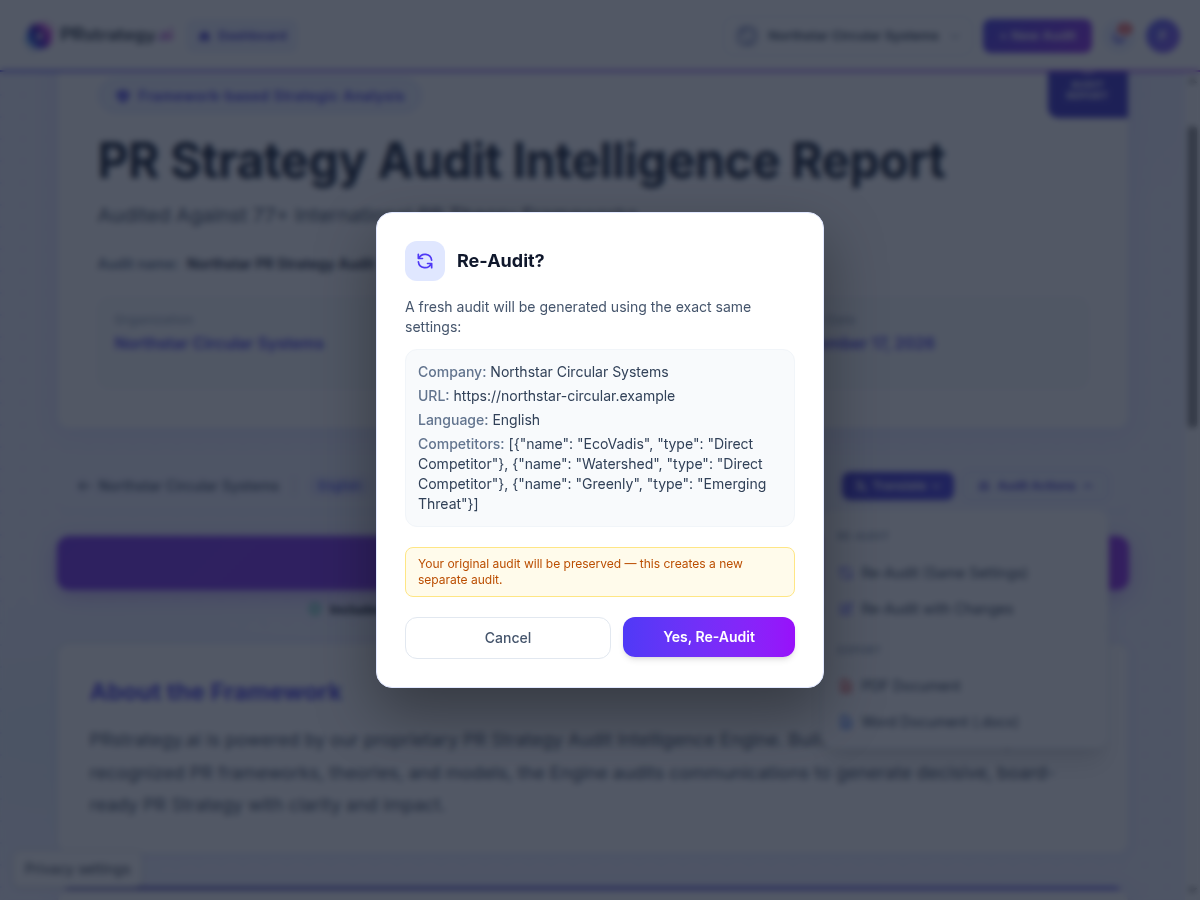
- 3Check the company, URL, language, and competitors shown in the confirmation window.
- 4Choose Yes, Re-Audit. A separate audit is created and the original remains unchanged.
Re-Audit with Changes
This option opens the same four-step audit form with the original answers already filled. Review every step, change only what is now different, and submit the revised brief as a new audit.
What to review on each step
- 1. OrganizationUpdate the description, strategic outcome, primary audience, company size, industry, markets, crisis status, messaging, boilerplate, or campaign focus.
- 2. CompetitiveRemove outdated competitors, add new ones, and correct each relationship type.
- 3. ObjectivesChange selected goals and re-rank the primary, secondary, and tertiary objectives. Revise the custom measurable goal if priorities or timing changed.
- 4. ConfigureUpdate language, report directions, white-label choice, and the latest baseline metrics. Check the final review summary before submission.
The new audit is linked to the original for future comparison, but the original report is preserved.
Generate your PR Strategy
Open a completed audit and choose Generate Your PR Strategy. The strategy uses the audit's primary objective, target market, audience, findings, and framework gaps as its foundation.
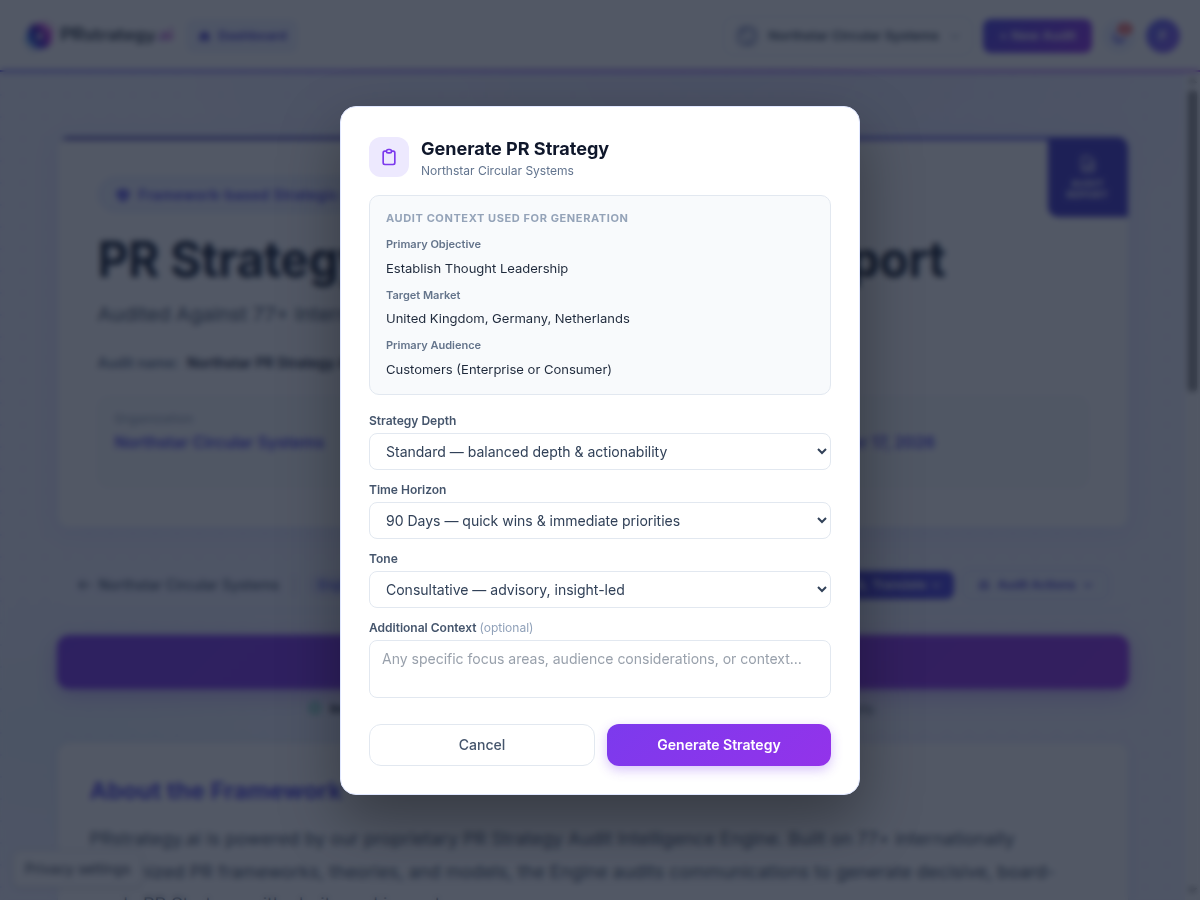
Strategy Depth
- ExecutiveA concise, board-level overview. Choose this for senior leaders who need direction, priorities, and decisions without extensive implementation detail.
- Standard DefaultBalanced strategic depth and actionability. Suitable for most in-house communications teams and agency briefs.
- AdvancedComprehensive, consulting-grade detail. Choose this for complex organizations, multi-market programmes, or teams that need a deeper implementation framework.
Time Horizon
- 90 Days DefaultFocuses on quick wins, immediate priorities, and the first execution cycle.
- 6 MonthsCreates a medium-term strategic plan with enough time for campaigns, stakeholder development, and measurable movement.
- 12 MonthsCreates an annual communications roadmap for longer programmes, multiple campaigns, and phased measurement.
Tone
- CorporateFormal enterprise language for established companies, institutions, and governance-heavy environments.
- Consultative DefaultAdvisory, insight-led language that explains the reasoning behind recommendations.
- BoldProvocative challenger-brand language for organizations seeking a more assertive market position.
- Board-ReadyExecutive briefing format designed for leadership, board, or client presentation.
Additional Context Optional
Add instructions that should shape the strategy but were not fully covered by the audit. Include focus areas, audience considerations, internal constraints, important dates, markets, channels, or exclusions.
Recommended Northstar settings
Standard depth · 6 Months · Consultative tone. This gives the communications team enough detail for launch planning while keeping the strategy practical and easy to present internally.
- 1Confirm the read-only audit context at the top of the window.
- 2Select the depth, time horizon, and tone that match the intended reader and execution period.
- 3Add context only when it is accurate and materially changes the plan.
- 4Choose Generate Strategy. The status page opens while the strategy is generated.